How to Install IPTV on Apple / iOS Devices (iPhone, iPad & Apple TV)
Streaming IPTV on Apple devices has never been easier. Whether you’re using an iPhone, iPad, or Apple TV, IPTV apps allow you to watch live TV, movies, and series in one place. One of the most popular and reliable apps for iOS is IPTV Smarters Pro.
In this guide from smartersflex.com, we’ll show you step by step how to install and set up IPTV on iOS devices quickly and safely.
What Is IPTV Smarters Pro?
IPTV Smarters Pro is a powerful IPTV player that supports:
- Live TV channels
- Movies & TV series (VOD)
- EPG (TV Guide)
- Xtream Codes API
- M3U playlist URLs
⚠️ Note: IPTV Smarters Pro does not provide channels. You must use IPTV credentials from a provider like smartersflex.com.
Devices Compatible with IPTV Smarters Pro
You can install IPTV Smarters Pro on:
- iPhone (iOS)
- iPad (iPadOS)
- Apple TV (tvOS)
This makes it ideal if you want IPTV access across multiple Apple devices.
Step-by-Step Guide: Install IPTV on Apple / iOS
Step 1: Download IPTV Smarters Pro from the App Store
- Open the App Store on your iPhone, iPad, or Apple TV
- Search for “IPTV Smarters Pro”
- Make sure the developer is WHMCS Smarters
- Tap Get and install the app
Step 2: Open the App & Accept Permissions
- Launch IPTV Smarters Pro
- Accept required permissions (network access, storage if requested)
This allows the app to load channels and stream smoothly.
Step 3: Log In to Your IPTV Account
You can log in using two methods. We recommend Xtream Codes for best performance.
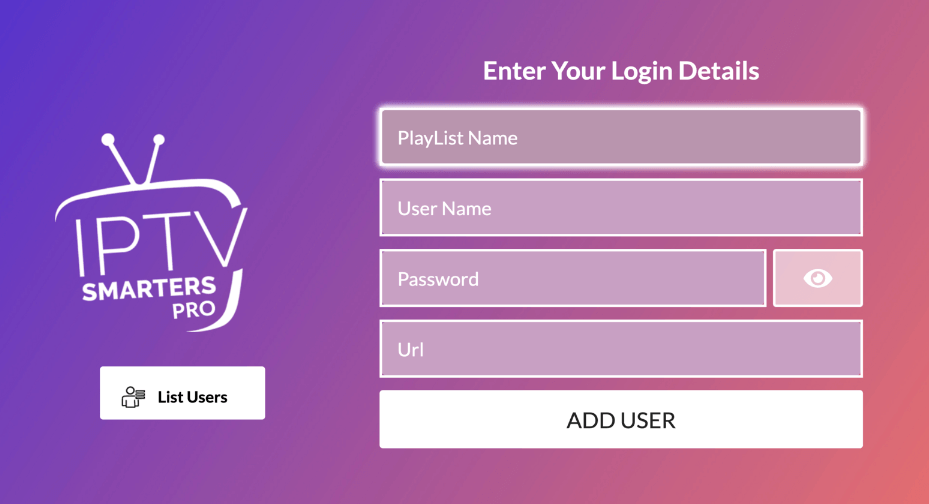
Option A: Login with Xtream Codes API (Recommended)
- Select Login with Xtream Codes API
- Enter the following details (provided by smartersflex.com):
- Username
- Password
- Portal URL (example:
http://yourproviderurl.com)
- Tap Add User
- Wait for channels and VOD to load
✔️ This method provides faster loading, EPG support, and better stability.
Option B: Login with M3U Playlist URL
- Select Load Your Playlist or File / URL
- Choose From Remote URL
- Paste your M3U link from smartersflex.com
- Tap Add Playlist
✔️ Works well, but fewer features than Xtream Codes.
Step 4: Customize IPTV Smarters Pro (Optional but Recommended)
You can improve your viewing experience by adjusting settings:
📺 EPG (TV Guide)
- Add an EPG URL in settings
- View live program schedules
🔐 Parental Control
- Lock adult or restricted content
- Protect kids from unwanted channels
▶️ Player Settings
- Switch between Native Player or VLC Player
- Improve video playback and reduce buffering
Step 5: Start Watching IPTV on iOS
Once setup is complete:
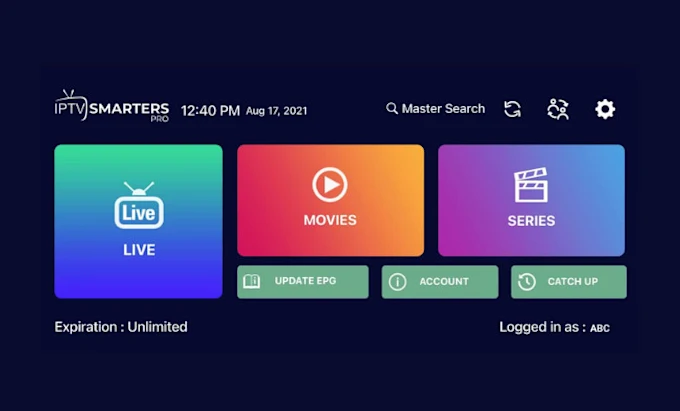
- Go to Live TV for channels
- Open Movies for VOD
- Browse Series for TV shows
Use:
- Touchscreen on iPhone & iPad
- Siri Remote on Apple TV
Enjoy smooth IPTV streaming anywhere.
Why Use smartersflex.com for IPTV on iOS?
Choosing the right IPTV provider matters. With smartersflex.com, you get:
✅ Stable servers
✅ High-quality HD & 4K streams
✅ Fast activation
✅ Works perfectly with IPTV Smarters Pro
✅ Compatible with iOS, Android, Smart TV & Firestick
Your IPTV experience depends on both the app and the service, and smartersflex.com is optimized for both.
Common IPTV Issues on iOS (and Fixes)
Buffering issues
- Check your internet speed (minimum 15–20 Mbps for HD)
- Switch video player in settings
Channels not loading
- Re-login using Xtream Codes
- Restart the app
EPG not showing
- Refresh EPG in settings
- Confirm correct EPG URL from provider
Conclusion
Installing IPTV on Apple devices is simple when using IPTV Smarters Pro. In just a few minutes, you can turn your iPhone, iPad, or Apple TV into a full entertainment hub.
For the best results, always use a trusted IPTV service like smartersflex.com, which is fully compatible with iOS devices and IPTV Smarters Pro.
👉 Ready to start streaming? Visit smartersflex.com and enjoy IPTV without limits.